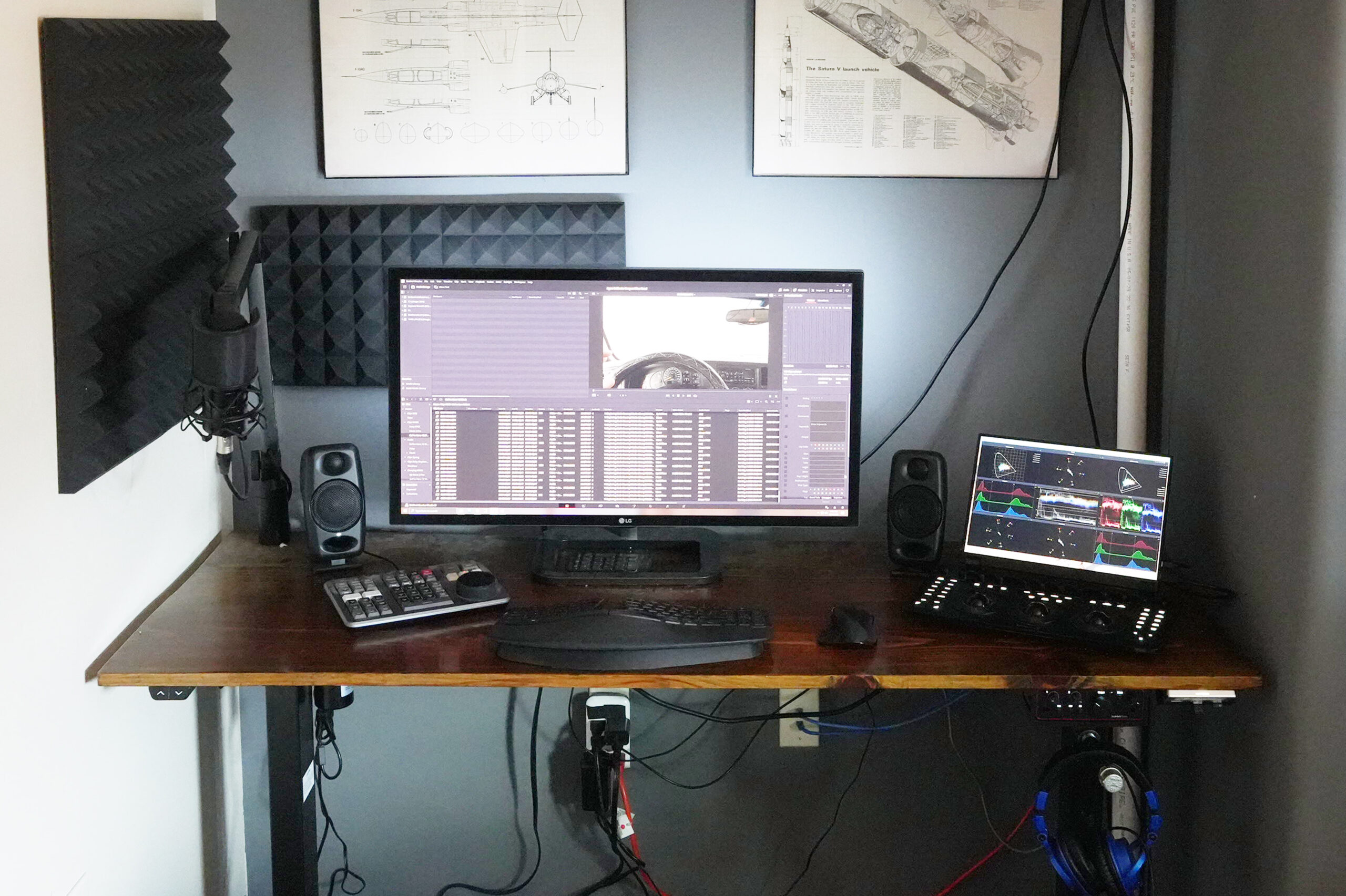
I got into video editing back in the 1990’s with basically two VCR(s) to cut clips we made of our model rocket launches. From there I found an early version of Adobe Premiere and got a PC video capture card. This snowballed after I left engineering in 2011 and became a full time editor. Over the years I’ve tested tens of thousands of dollars in freelance equipment. Here’s my current editing setup and thoughts…
Software lags hardware design by a matter of years. So I try to buy used top shelf equipment. For instance my processor was thousands of dollars when it came out. I bought it for a couple hundred bucks. This ensures I don’t overpay for hardware nobody’s had a chance to develop software for yet.
What’s in the box
- Windows 10 Ultimate
- DaVinci Resolve Studio
- Liquid Cooling
- 850W Power Supply
- Intel I7 Extreme 6950X 3.5 Ghz 10 core
- ASRock X99 M Killer Motherboard
- Nvidia Zotac 5070 Ti 16GB SFF (only card that would fit in my case!)
- 64 GB Ram
- 1 TB m.2 main drive
- 4 TB Crucial BX500 SSD Cache & Proxy drive
I had previously sought out what drives are fastest but realized the drives are much faster than editing a 4k workflow even needs. My second iteration of buying drives for this machine didn’t focus on speed but rather size.
Crucial branded SSD Garbage Collection Routine: You may like to forego Crucial drives unless they’ve updated their “garbage collection”. The routine for the drive I purchased requires the drive be idle to clean up deleted space on the disk. You have to periodically leave the computer in the BIOS screen prior to bootup so the drive has enough idle time. Otherwise, the garbage (deleted media) never really gets deleted. It clogs the drive and my editing software grinds to a halt, despite the drive showing it’s mostly empty. Was very difficult to figure this out, in hindsight I’d have looked for a different brand drive that has another method to release deleted space on the disk.
Displays
- MAIN: LG 31MU97 32″ 4k SDR 10-bit DCI-P3 Monitor
- SCOPES: Generic: 13.3″ portable display
- TimeLine Preview: ViewSonic VX1655-4K-OLED 15.6″ Portable Display
- SCREENING: 85″ Hisense U7
- Bias Lighting: Media Light LX1 D65
I purchased a theater TV to screen my videos in front of sample audiences. This is located in a different room from my editing machine. The distance is too far to reasonably run a monitor cable (or remote mount the editing machine). Lest I remodel my house and do a bunch of low voltage wiring, repeaters, etc. which would be thousands of dollars.
Casting to theater TV
I tried casting / network monitor drivers. I could not find one that would support 10-bit HDR signal over my LAN. Also the drivers were low bitrate so the timeline preview looked terrible.
DCI-P3 SDR Display
My main display is amazing at SDR and DCI-P3 (cinema color space) coverage but cannot do HDR. Additionally, displays seem to be advertising DCI-P3 performance now, however, the new benchmark is Rec 2020 for HDR (aka Rec 2100). The DCI-P3 color space was defined when SDR was the standard. This makes it somewhat difficult to determine which display is best for HDR editing which can produce more colors than SDR monitors were designed to do.
You can spend $10,000 in search of a display directly optimized for Rec 2020. This used to be the case for DCI-P3 when I bought my display over a decade ago DCI-P3 broadcast quality displays were upwards of $25,000. Cost for color performance has substantially come down but complete Rec 2020 coverage is still out of reach for most freelancers.
Field Monitor
I tested a Ninja V field monitor plugging it directly into my editing machine as a 3rd monitor. It was fantastic for contrast and saturation but detail was difficult to see. It was also way to small for practical use. That said if Ninja made a larger field monitor with a bit better color performance it maybe a decent option for a space limited workspace. I’d want a good 10″ if not more though, the 5″ display was smaller than the pane containing Timeline Preview in DaVinci Resolve.
Traditional Budget LCD
I also tested a couple LCD HDR displays (Uperfect and ASUS). The LCD HDR displays cannot properly show the darks throwing off contrast and saturation. The ASUS ProArt seems to be marketed heavily towards editors. However, I’m not impressed with it’s color coverage statistics. I think you’re better off spending a few more dollars at that point and getting a broadcast geared monitor or a workstation monitor such as Samsung S80 with similar color stats and a fraction the cost. Especially if you can figure out how to hack and calibrate the ICC Profile for the S80 display.
Portable OLED
I ultimately arrived at a ViewSonic VX1655-4K-OLED 15.6″ portable display. I’m not a huge fan of having a massive screen for previewing the timeline. I think that results in your having to sit father back in which case a smaller screen would be fine. Ideally probably a ~30″ display would be best. However, my work space is limited so I opted for a portable display.
The contrast is great however, this thing has a nasty green cast. I think they made a standard calibration all displays were loaded with at the factory. That calibration may have been okay from the start but is far off for many of these monitors. In hindsight the reviews talk of this online (if you know to search VX1655 green cast). It’s not an ideal solution but I ordered a color calibration tool. I’m going to try and calibrate it out, however, software calibration creates issues where the color can clip in the display. Ideally this display would have hardware calibration. Perhaps somebody has hacked it as such?
Another crux is there’s no holes in back of this display for a VESA mount. I ended up 3D printing a mount which works great. This monitor would be ideal if it had hardware calibration. Otherwise, it might not be worth your time. I may end up having to shop out a different display sometime in the future.
O-LED vrs Mini-LED
Hisense bought out Sharp’s display tech when Sharp went under. Sharp was developing the MiniLED tech to compete with OLED. Mini-LED has a high resolution backlight allowing for localized contrast instead of a series of clunky white LED lights behind the display panel. This backlight tech is insane. It looks like my TV is off when it fades between scenes. It is brighter than OLED as well. It can light up my entire theater room when a bright scene is played at night.
OLED illuminates each pixel individually. OLED also seems to be able to display 10-bit directly, where as the Mini-LED panels are natively 8-bit and use FRC to achieve 10 bit color. This takes an 8-bit pixel and flickers it between adjacent colors to get the look of an intermediate color beyond the inherent 8-bit resolution of the pixel. I was initially worried about FRC. However, it has been a complete mute point.
The color performance of MiniLED with FRC doesn’t disappoint. I even tested it at 12-bit watching Ghost in the Shell which was INSANE. I could see details even in the darkest shadows. Whoever produced that movie, all I have to say is WOW.
It is conceivable that MiniLED with FRC could outperform OLED. When shopping I even compared OLED to MiniLED in the store I thought MiniLED looked better (caveat, they didn’t have the same sample footage playing). I’m very much pleased with the MiniLED tech. I think at this time they’re moving onto MicroLED to push this tech even father.
Editing Panels
These have become invaluable to my editing workflow, especially the color panel. I mainly use the speed editor for the shuttle controls. I need to learn how to better use the cut page. However, I’m so much faster in the edit page that it’s hard for me to stick to the cut page long enough to master it.
Keyboard and Mouse
I’m tired of wireless keyboards. It seems the batteries always go out at the worst time. I’m always second guessing if the keyboard is even working as well. A friend recommended my mouse which is wireless but can also be wired so I’m happy with it. Going forward I’m going to get a different keyboard though.
- Microsoft Sculpt (discontinued) -> Matias Sculpted (recommend wired version)
- LogiTech MX Master Mouse
Audio
I started doing voiceovers for which another friend in the business recommended using a powered condenser microphone. I purchased the interface he recommended but didn’t like it Rode Al-1. I think in hindsight it was capable of doing what I wanted but I never installed the software for it.
I’m not a big fan of software controls. I wanted buttons and knobs on the front of the device instead for which the Rode is limited. Another sound engineering friend put me onto the FocusRight Scarlett series. I purchased a Solo (single channel) which has been absolutely perfect for what I do. My only regret is not purchasing a unit with more channels as I’m starting to work with some surround sound design. The larger units have more outputs (as well as more inputs).
The Micro Monitors have proven invaluable. I get really sore wearing studio monitor headphones over long periods of time. They recreate a very flat, and accurate sound across the range. Plus they are compact and fit on most any desk.
- Audio Interface: Scarlett Solo
- Studio Monitor Speakers: IK Multimedia iLoud Micro Monitors
- Studio Monitor Headphones: audio-technica ATH M50x
- Condenser Microphone: audio-technica AT 2020
The search for a decent DAW
I tested a DAW to play with automation in the FairLight panel. I tested the ProSonus FaderPort in the process. It was built poorly, low resolution in the pan (15% per click) & faders. It was also clunky taking up the whole left hand side of my workstation for one fader. My friends in the industry don’t like ProSonus gear either. However, there’s a lot of reviews on the internet that steered me to their doorstep. Don’t fall for them avoid their equipment.
I may also look for a midi controller but have a sound engineer who can also handle these things so I can focus on the edits and color.
Project / Clip Storage
My projects are achieved on a networks attached storage (NAS). I believe I’m running RAID 5. The machine holds six 4TB drives. It’s connected over two 10GB lines to my local network. I seldom have any issue with playback from the drives. However, the network adapter in my editing machine only has two 1Gbps ports. It would be nice to run the full dual 10Gbps ports
GPU
I purchased a Nvida 5070 Ti as benchmarks showed it was only 15% slower than a 5080 which costs 30% more. The 5070 Ti was still a pretty penny, $1000. I was limited to a Zotac Small Form Factor (SFF) card as these cards are so insanely big they don’t fit in my case. Otherwise I could have picked up a 5070 Ti for $50 cheaper.
I’m just starting to play with the 5070. It’s not a perfect solution but does seem to be an improvement over my 2080 Ti it replaced. The 2080 Ti would playback a 4k timeline with color correcting, balancing, color space transforms, and light effects. It wouldn’t drop frames most but not all the time.
The 2080 Ti could not handle noise reduction nodes, some fusion stuff, and played back magic mask at like 3 FPS. Upon initial testing the 5070 Ti isn’t much different in those regards. However, it doesn’t drop frames otherwise.
I am hoping this improved GPU will increase my productivity. Time has yet to tell…
My Thoughts
My CPU is seldom taxed during editing. Hardly worth considering an upgrade at this point there other than for improvements in motherboard architecture. None the less a friend and I are currently testing if the new Intel chipsets with NPU / GPU on the die will improve performance.
I got into color grading a little over a year ago. This is where some big dollars can be spent. Ideally I’d have a Flanders Scientific display to accurately show colors well into the Rec 2020 color space. These are in the many thousands of dollars though.
Oddly, the cost for color performance is dramatically less on theater TV panels than on workstation monitors. Something like a Sony Bravia 7 TV can be hand for a fraction the cost of say the Flanders Scientific display and only sacrifices a bit of color performance. Although calibrating it maybe a challenge unto itself.
Moving into my last thought, I discovered the Sony Bravia 7 TV after I had it in my mind to buy a Hisense U7. The Hisense U7 was about 25% less expensive. However, a friend purchased the Bravia 7 on sale for the same price I paid for my Hisense U7!
The Sony Bravia 7 had noticeably more color accuracy in the shadows. I think Hisense may have updated the latest iteration of the U7 to compete. However, keep a close eye on the panels. You can get some steals for them from time to time.
I’m starting to collaborate on projects. I may also consider the Black Magic Cloud. There you can sync project files so collaborators can work together in real time. I have a friend assisting me with Sound design and we may try this in the near future.
I’d love to hear from you. Let me know what your setup is and if you have any questions!
